Latest WP Version 6.8 “Cecil”. It is important to update your site to the latest version. Make sure your plugins and theme are up to date.
You can read and check out what’s new in this version by clicking on the following link WordPress 6.8 “Cecil”.
Last Updated: April 19, 2025
Remember make sure all your plugins and theme are up to date and compatible with the latest WordPress version before you upgrade or update your website. Always create a backup before you go ahead.
Latest Update: Updated the information.
If you need to find out what is happening with WordPress you can check the following URL https://wpscan.com/. This URL lets you know all about the updates, latest WordPress version, vulnerabilities and fixes. This link also pinpoints the importance of having the latest version installed.
(Current Stable Version highly recommended) WordPress 6.8, 6.7, 6.6 and 6.5.
(Previous and stable versions okay to use however you should update as soon as possible.) WordPress 6.4, 6.3, 6.2 and 6.1.
Important: I don’t recommend older versions of WordPress. Update to the latest version as soon as possible.
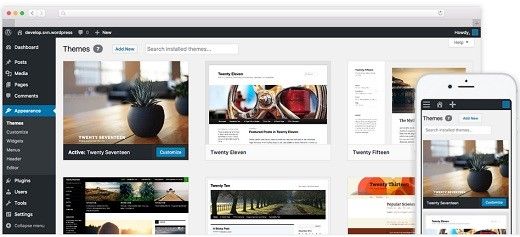
Latest WP Version 6.8
If you want to test the latest WordPress version no matter if it is in Beta or Release Candidate version then I suggest you install the following plugin WordPress Beta Tester on a test machine or WordPress test platform. This is very important if you want to know whether or not your current setup will work with the next WordPress version.
WordPress Roadmap:
WordPress Default Themes Twenty Family
WordPress has a number of default themes that begin with the name Twenty. These themes are always updated to work with the latest WordPress version released. If you can’t find the correct theme for your site in the repository, then simply install one of the following default themes. This will give you a heads start until you find the correct theme for your site. These themes are clean, simple and easy to setup. Remember they are updated by the WordPress community regularly.
WordPress Twenty Theme Family List:
- Ten = To learn more about the latest version click on Twenty Ten changelog. Note: The following forum post can help you fix the responsive issue many have reported in the past.
- Eleven = To learn more about the latest version click on Twenty Eleven changelog.
- Twelve = To learn more about the latest version click on Twenty Twelve changelog.
- Thirteen = To learn more about the latest version click on Twenty Thirteen changelog.
- Fourteen = To learn more about the latest version click on Twenty Fourteen changelog.
- Fifteen = To learn more about the latest version click on Twenty Fifteen changelog.
- Sixteen = To learn more about the latest version click on Twenty Sixteen changelog. Note: The following plugin can help you customize the theme.
- Seventeen = To learn more about the latest version click on Twenty Seventeen changelog. Note: The following plugins can help you customize the theme.
- Nineteen = To learn more about the latest version click on Twenty Nineteen changelog. Note: The following plugin can help you customize the theme.
- Twenty = To learn more about the latest version click on Twenty Twenty changelog. Note: The following plugin can help you customize the theme.
- Twenty-One = To learn more about the latest version click on Twenty Twenty-One changelog.
- Twenty-Two = To learn more about the latest version click on Twenty Twenty-Two changelog.
- Twenty-Three = To learn more about the latest version click on Twenty Twenty-Three changelog.
- Twenty-Four = To learn more about the latest version click on Twenty Twenty-Four changelog.
If you are looking for a child theme for the Twenty family list above, click on the following URL wordpress-theme-wordpress-web-development.
WordPress Old Release Information
Important Discovery: WordPress 3.5.0 and 3.5.1 have removed the Title tag when inserting images into your post and pages. Please be aware of this. There is a plugin available Restore Image Title that will add the title back to the images when you insert them. I got the above information from Sue Surdam in linkedin WordPress community. Here is her article Get Back the Missing Image…..
Finally WordPress 3.3 is out please have a look at the latest updates at the WordPress codex site. There are so many new options, I am sure you will love them. Remember to backup your website before upgrading to the latest version.
WordPress 3.3 Release Candidate 3 is out. The following words are from wordpress.org The third (and hopefully final!) release candidate for WordPress 3.3 is now available. Since RC2, we’ve done a handful of last-minute tweaks and bugfixes that we felt were necessary. Our goal is to release version 3.3 early next week, so plugin and theme authors, this is your last pre-release chance to test your plugins and themes to find any……
So come next week you can install WordPress 3.3 but before you go ahead make a backup of your website and have a look at your theme and plugins before you go ahead. Make sure that theme and plugins can handle the new version of WordPress. If you have a testing site then use that testing site first and test everything that is running on your website on the testing site.
WordPress 3.3 RC 2 has been released. I can see the new version out very soon. I can’t wait for it. They have mentioned new features and improved on some already existing options.
WordPress 3.3 RC 1 has been released. They are very close to releasing the official WordPress 3.3.
They have released WordPress 3.3 Beta 4. Beta 4 has many bugs fixed. They getting closer to releasing the first candidate. So many new options have been added and the GUI has been improved as well. I can’t wait for version 3.3 to come out.
They have released WordPress 3.2 and 3.2.1, this release brings WordPress to the next level of performance and usability. It also comes with a new theme “Twenty Eleven 1.1” which is an update to the previous version “Twenty Ten 1.2”. This new theme brings WordPress to a new level both cosmetic and user friendly. They have really done their homework with this new release. I am sure all you WordPress lover’s, will love this latest version.
They have released WordPress 3.1.2. It is a security release for all previous WordPress. As you are aware you should always update to the latest version of WordPress.
They are also working on WordPress 3.1 Release Candidate 4, which is going to improve many features not yet found in the current version of WordPress. I am looking forward for this version to come out so that I can use it live on my sites.
WordPress 3.0.5 is here, it was released on the 7th of February, 2011. This fixes some security vulnerability found in previous version and increases the security and stability. It is recommended that you update to the latest version of WordPress.
If you have any questions or need to know how to install and setup WordPress, leave a message and I will be glad to help you.
You might like to read all my WordPress tutorials.
 I have been working in IT since 1999 and I enjoy the challenges it brings me. I love developing websites with WordPress. I spend a lot of time helping out in wordpress.org forums. I have been writing tutorials since 2011. Now I am learning how to manage my own VPS "Virtual Private Server.
Hi, I just updated to WP 3.3.1 and the blog members are complaining because it’s so difficult now to access the built-in private messaging function. It is much harder to access the inbox now – is there a way to have it appear somewhere more prominently?
Hello Denis, thank you for your question?
Can you please elaborate more what are you trying to achieve. If you have a look at the admin panel on the top you will see that a message symbol will display any new message submitted.
When you mention the inbox, are you referring the point above?
Kind regards
O really? What are the added feature in the updated wordpress version?
Hello and thank you for your question. If you click on the above link it will provide another link where it illustrates the code improvement. Click on the following WordPress 3.4 rc2 to view the changes.
Hello,
Can someone please help me; I just installed WordPress 4.1 and my visual editor isn’t working. It looks like there’s a bug in the code.
Thanks,
Stephanie
Hi Stephanie, thank you for your question. Have you tried a different theme? Have you also tried to deactivate all your plugins and see if the issue goes away. If it does then start enabling one by one your plugins until you come across the plugin that causes the issue.
Let me know if that helps you.
Regards
Same problem as Stephanie… Just updated (automatically) to 4.1.1 and now the visual editor isn’t working.
Stephanie, did you find a fix? I don’t have any plugins enabled and I have the default theme but can’t edit/create pages or posts now….
thanks!
Hi Seani, thank you for your question. Did you try different browsers?