May 172012
 
convert-website-from-joomla-1-5-to-joomla-1-7-rev-10

Donate for a cup of coffee :)

I have added new entries see below.

Important: Joomla has now released Joomla 2.5.4 with a few fixes and patches. However these instructions still apply and once you have upgraded to Joomla 1.7.5 then use the extension manager in Joomla to upgrade to version Joomla 2.5.4.

Jupgrade has been updated to version 2.5.1, which is compatible with Joomla 2.5 +. This means that if you run jupgrade it should download Joomla 2.5 +.

Check out what’s new in the latest version of jupgrade 2.5.1

Check out what’s new in Joomla 2.5.4, they have done a wonderful job with this latest Joomla version :)

Hello all, it is my pleasure to share with you the successful conversion of my website mbrsolution from Joomla 1.5 to Joomla 1.7 using jupgrade.

Jupgrade is a great component that will help you convert your website to Joomla 1.7 it also applies to Joomla 1.6 but why would you want to upgrade to Joomla 1.6. Please read the following article Joomla Development Network to know more about Joomla’s life cycle.

There are steps you need to take before you upgrade and after you upgrade Joomla.

The following are the steps that I took to successfully convert my site.

1) Install jupgrade on your website following the instructions found in nirmaltv.com.

2) Start working on your site, which is going to take some tweaking and editing depending on the template you use. My template is not compatible with IE 6, I have tweaked it a bit for IE 6 but I am not really concern as IE 6 is slowly been face out. I have installed an IE plugin to remind the visitor using an older version of IE, which may not display my website correctly. I will work a bit more on the code to get it to work a bit better for IE 6.

3) Make sure that all your plugins, modules and components are compatible with the new version of Joomla. I had to convert the code on one particular module for it to work properly. It took me some research and many hours but I was very happy to finally have it working :) I have found out the hard way, it is better to delete a module, component or plugin that is not yet compatible with Joomla 1.7 before upgrading. After I converted my website I had some issues trying to delete a file that did not exist or was not compatible with the latest version.

4) The following are my components installed that are compatible with Joomal 1.7 1) Admin Tools, 2) Akeeba Backup, 3) Easybook Reloaded, 4) Fox Contact, 5) JV-linkExchanger, 6) VipPortfolio. Admin Tools and Akeeba Backup are in my opinion 2 components you must installed in your Joomla website. Akeeba Backup is the most easy and extremely useful component to have if you want to create backups.

5) Make sure that all links are working properly. There are many online sites that you can use to help you find those broken links. I have listed one 1) Link Diagnosis, and you can also download this excellent tool for windows 2) Xenu.

6) If you really want to know how well your site is doing check woorank, this tool will show the most common problems with your website and provide a guide to help you fix and repair some of the problems you are having that you might not even be aware. This is very important for better SEO optimization.

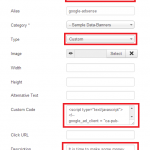
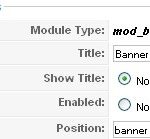
7) Make sure that you check and enable the banners that are not active. One of the reasons this occurs is because your previous version was using position left, right, banner etc and the new version comes with position-0, position-1, position-2 etc. Also when you activate your banners, check the type and select custom if you are using a custom code.

8 ) Once you are happy with your upgrade then follow the normal procedures to move your Joomla site from one folder to another folder as mentioned in step 1 from nirmaltv.com.

9) Follow the steps carefully as illustrated below:

—-Move all the files and folders from your Joomla folder to the new directory. For example from public_html to public_html/oldjoomlasite

—-Move all the files and folders from jupgrade folder to public_html

—-Your site should be live with the new Joomla 1.7 look. To add more style to my site I changed the template with a Joomla 1.7 version template of the same style as I had with my previous version of Joomla 1.5. You might have to do the same with your template.

If you have any problems, one solution could be to check the following to make sure that the data is entered correctly.

Check your configuration.php file and make sure the following changes are set correctly:

From: var $log_path = ‘/home/user/public_html/jupgrade/logs’;

To: var $log_path = ‘/home/user/public_html/logs’;

From: var $tmp_path = ‘/home/user/public_html/jupgrade/tmp’;

To: var $tmp_path = ‘/home/user/public_html/tmp’;

From: var $ftp_root = ‘/public_html/jupgrade’;

To: var $ftp_root = ‘/public_html’;

From: var $live_site = ‘http://www.yourdomain.com/jupgrade’;

To: var $live_site = ‘http://www.yourdomain.com’;

You could also remove the content of the cache folder (public_html/cache in this example)

10) Very important, make a backup of both of your sites before you start working on the upgrade and before you move the new version mentioned on step 8, in case something goes wrong.

11) After you have moved the website to the root of your server if that is where you will be installing Joomla, delete the files from oldjoomlasite backup once you are happy with the new version. If anything goes wrong restore the the backup and find out where you weren’t wrong and try again. Remember there is no hurry so take your time and don’t rush.

Hopefully at this point everything is working ok and your site is live. Just keep checking especially on the backend to see if everything is working well. If you have any questions just post them here and I will be glad to help you.

New I have come across this great component Art Adminer which will help you manage your database and remove any database tables that are obsolete plus much more. I have used to remove some very old tables left behind from my Joomla 1.5 installation that I was not even aware. I noticed that there were some issues with my site when I saw some entries in Google Webmasters tools. Also every time you tried to create a new module you could see duplicate modules.

Important: If jupgrade updates your joomla version to 2.5.4 then you don’t have to worry about the following line.

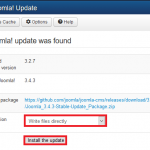
Once you have upgraded to Joomla 1.7.5 then follow these Joomla instructions to upgrade to Joomla 2.5.0 or Joomla 2.5.4.

Good luck :)

May 172012
 
before-you-publish-a-website-revision-update

When you decide you want to publish a website, what do you do? The information here is very similar to my Write Your First Blog post.

There are many questions to consider before you start developing your website. Many people decide to publish a website before they even look at some of the most important questions that you must consider before you even go ahead and publish a website. After they have submitted their website they realise how much is missing. You don’t want this to happen to you.

I have put together some of the questions that I ask my clients before I go ahead and design their website and publish it.

Take a look at the list below and answer these questions before you consider developing and publishing your website.

Requirements:

  1. Which host will you sign up with? I have been using justhost for 3 years now and I am very happy with their services.
  2. What is the domain name for your website? You have to make sure that it is available first. Do a search on Google and see if that name is taken.
  3. Will your website target your country or the world i.e. www.yourname.com.au or www.yourname.com? Will your site have www or will you omit it from the URL? This is important as you want all traffic to be directed to the correct URL i.e. http://www.yourdomain.com is different to http://yourdomain.com.
  4. How many web pages are you going to have? You need to develop this information and be happy with the design, pages and layout before you decide to develop your website. Make sure you are happy with your decision here as it is very challenging to change your pages and layout ones you site is live.
  5. What template or theme will you setup for your website? The layout is very important as well. Depending on your audience you want to attract that is the template or theme you will need to implement on your website or blog.
  6. What will you include in your About Me page? Give your audience something that will make them want to purchase your product or do business with you. Be honest about what you have done and or currently doing.
  7. What Information about your services or products will you provide? This part will attract people to visit your website, the more information you add here the more people you will attract to your website.
  8. Do you have a portfolio? It would be great to add a portfolio page in your website. This will populate as your business grows.
  9. Are you going to provide links in your website? What kind of links? Very important for SEO and promoting your sight with Google, Bing and Yahoo. One of the best methods is reciprocal linking especially with sites that promote the same or similar services as yours.
  10. Will you be adding an email address, mobile phone number and business address in the Contact Us page? Will you add a contact us form? Very important to note that if you are going to add an e-mail address link visible, to make sure it is a domain e-mail i.e. your domain name is www.yourdomain.com and the e-mail address should be yourname@yourdomain.com. This is a great method to further promote your business and website.
  11. Do you have an ABN “Australian Business Number” for Australia? Other countries have different business numbers, if so would you include it in your website? This is great for business; you want potential clients to know that you are legitimate and that you are here to stay.
  12. What Meta tag and Meta description will you add to promote your website? This requires a bit of research as this will either promote your website quickly or leave you at the end of the line somewhere where no one will find you.
  13. SEO “Search Engine Optimisation” how are you going to promote your website to search engines like Google, Bing and Yahoo? Do you have a Google account? If not, then I suggest that you create one!! One of the most important part of promoting your website is with one of the most important search engines in the world, “Google”. You want to know what goes on behind your back with some incredible FREE tools that Google so nicely have included for you to use once you sign up. The following are just a few of the many tools you will have access to: Webmaster tools, Analytics, Google places, Profile, YouTube, Calendar and Feedburner.
  14. Are you going to have an RSS “Really Simple Syndication” feed? You need to have this in place if you want people to sign up and follow your feeds. You can use Feedburner from Google mentioned previously.
  15. Are you going to promote your website with social networks like facebook and twitter? If you don’t then you are going to miss out on a potential market worth millions of visitors. Do the sums and you will see that it is very important to get involved with these social networks?
  16. Will you be including YouTube videos, photos or tutorials? How will you attract people to your site if you don’t give them something they want or need?
  17. What about a testimonial page? This is just as important as the above. Try and get all your clients, business partners and friends to submit testimonials or reviews about your services or products.
  18. It is very important to maintain a vigilant eye on your site. If you use a CMS “Content Management System” like Joomla or WordPress, then you will realise that these CMS get updated regularly. Security updates, module, component or plugins you use will always get updates.
  19. Security. What kind of security will you be implementing? Depending on your CMS or just plain html website. Since I am using WordPress for this blog, they have many plugins that help you maintain a secured website.
  20. One more important factor to remember! and one that many forget to do is “BACKUP”. Backup your website when you first setup and publish your website. Create new backups every time you update your site. Have a copy on the server and one on your local computer or laptop. Believe me I have had my share of incidents without a backup and the feeling is not very nice.

Good luck with your website and remember if you have any questions, post a comment here and I will be glad to help you.

If you need a website developed, need to promote your website and services then send me an e-mail. My rates are very economical ?

May 142012
 
joomla-backup-and-restore

This tutorial teaches you how to backup and restore joomla using Akeeba Backup. Akeeba backup is one of the best software to backup your joomla installation. I have used it for a few years now without a problem and I always recommend it to everyone that runs Joomla and would like to use a free backup software. I can tell you that it has saved my site many times.

Hint: Click on an image to see a larger size

First download Akeeba Backup and install it as you would normally install a module or component. Login to joomla as the administrator and upload the zipped file you downloaded above and configure it according to your requirements.

Hint: It is recommended to use jpa compression format. Have a read about the difference between zip and jpa format from Akeeba Backup user guide online

Once you have configured Akeeba backup click on Components >> Akeeba Backup and then click on Backup Now. See images below:

Step 1) Click on Akeeba Backup

Akeeba backup now

Step 2) Click on Backup Now

Click backup now

Step 3) Click Backup Now! and you can enter some description.

akeeba backup and enter description

Step 4) View the backup in process

Important: Do not brows to another page while you are in backup mode unless you see an error

Akeeba backup process

Step 5) Administer your backup file

Ckeck completed backup akeeba

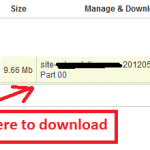
 Step 6) View the file details including the size and you can download the file.

Hint: I prefer to use FTP to download any files from the server

Akeeba backup completed and option to download

Backing up is very simple as you can see from the instructions above.

In the following steps you will learn how to restore your website to the same server:

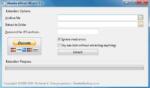
Step 1) Unzipped the file you downloaded in Step 6) using akeeba extract wizard above and zip the content in a format that your server can read i.e. .zip format. Hint: Only use akeeba extract wizard if you zipped your file in jpa format.

Step 2) Log into your server and delete your old website files from the root of your site 

Important: Delete only joomla files and joomla folders, no other files. You can keep a copy of .htacess but rename it to something like htacess.txt and after the success of the installation make sure that you rename it back to .htaccess only if the zipped .htaccess is corrupted for some unknown issue.

Step 3) Upload the zipped file to your server and unpack the content to the root of your website where you deleted the joomla folders and files

Step 4) After unpacking make sure that all the folders and files are there or else you will get errors when you start the installation process

Step 5) Now open your web browser and type the URL of your website i.e. http://www.example.com/installation/index.php click enter on your key board and follow the onscreen instructions.

Important: Make sure you select to remove the installation directory automatically. See images below:

Remove the installation directory akeeba backup

Installation directory deleted, click OK

Installation directory deleted Akeeba backup

 Step 6) That’s it, your joomla website should be up and running. It is as simple as that :)

TIP: Make sure that you have access to your password and database name which you documented when you installed joomla for the first time and kept in a safe place. This is very important just in case something goes wrong and you need to add the username and password.

I Hope these instructions can assist you, if you have any questions send me an e-mail or post a message here.

Good luck ;)